N5ZY Co-Pilot: VHF Contest Automation for Rovers
By Marcus N5ZY | February 2026 | v1.8.52
After years of juggling multiple WSJT-X instances, manual grid updates, and the constant fear of losing QSOs to UDP packet drops during VHF contests, I finally built the tool I always wanted. The “N5ZY Co-Pilot” is a Python application designed specifically for VHF/UHF rover operations, automating the tedious stuff so you can focus on making contacts. No Python experience required!
Developed over January 2026 with assistance from Claude (Anthropic), turning scattered ideas into working code just in time for the January VHF Contest. After the contest the ideas continued to appear in my mind and I kept adding (is an Engineer ever done? No!)
The Problem
For me personally running a multi-radio rover station during ARRL VHF contests is an exercise in multitasking chaos:
- Three radios, three WSJT-X instances – IC-7610 on 6m, IC-9700 on 2m/70cm/23cm, IC-7300 with transverters on 1.25m/33cm
- Existing tools dropping QSOs – Apps using UDP multicast are fire-and-forget; when two radios decode simultaneously, packets vanish. Most also only support two WSJT-X instances, which doesn’t cut it for a multi-band rover setup
- Manual grid updates – Every boundary crossing means updating N1MM+, all three WSJT-X instances, and hoping I didn’t fat-finger it after 10 hours of contesting or after a distraction
- No situational awareness – Who else is on the band? Is there a Sporadic-E opening I’m missing?
- County tracking for QSO Parties – State QSO Parties require county exchanges, but grid squares can span multiple counties. Furthermore for upload to LoTW each QSO needs the County and Grid.
The Solution
The N5ZY Co-Pilot runs on my rover laptop and handles all of this automatically.
Core Features
Automatic Grid Updates A $9 USB GPS dongle feeds coordinates to Co-Pilot, which converts them to Maidenhead grid squares and pushes updates to:
- All WSJT-X instances via UDP
- N1MM+ via RoverQTH
- APRS-IS for position beaconing
Cross a grid boundary? Everything updates automatically. No menus, no typos, no forgotten updates and it provides an audio alert!
Reliable QSO Relay The N5ZY Co-Pilot listens directly to WSJT-X UDP broadcasts and queues QSOs for N1MM+ (or N3FJP). It uses a sequential queue with retry logic, supporting up to four WSJT-X instances simultaneously. No more lost contacts when multiple radios decode at once.
Automatic County Detection (NEW in v1.8.32) For State QSO Parties, the N5ZY Co-Pilot now automatically detects which county you’re in using GPS coordinates and a Census Bureau shapefile containing all 3,235 US counties. The GPS position is checked on every reading (~2/second), so county line crossings are detected instantly.
When you cross a county line:
- N1MM+ RoverQTH updates automatically (e.g., “OKL” → “LOG”)
- Voice announces: “County change. Now in Logan”
- The UI button updates to show the new county code
- All QSOs are stamped with MY_STATE and MY_CNTY for proper LoTW uploads
Currently includes mapping for the Oklahoma QSO Party (77 counties) from the full county name to the contest county acronym. Add your own state’s JSON mapping file for other QSO parties.
GPS-Stamped ADIF Records Every QSO logged through the N5ZY Co-Pilot is stamped with full location data for accurate LoTW uploads:
- MY_STATE, MY_CNTY – From county shapefile lookup
- MY_LAT, MY_LON – GPS coordinates in ADIF format
- MY_GRIDSQUARE – 6-character grid from GPS
/R Rover DXCC Fix Log4OM was misidentifying /R callsigns as European Russia. The N5ZY Co-Pilot now adds explicit DXCC fields for any /R callsign, ensuring proper LoTW matching.
Battery Monitoring Connected to my Victron SmartShunt via Bluetooth, the N5ZY Co-Pilot displays voltage, current draw, and state of charge right in the status bar: 13.2V -15A 85%. At a glance you know if you need to swap batteries at the next stop before getting on the air. Color-coded warnings (green/orange/red) and voice alerts catch critical voltage drops during transmit.
Voice Announcements
“Grid change. Entering EM15.”
“QSO logged. W5ABC.”
“Warning: GPS lock lost.”
“County change. Now in Logan.”
Hands-free awareness while driving between grids! Very important for the individual operator/driver of a Rover!
Situational Awareness
PSK Reporter Integration Monitors PSK Reporter every 5 minutes for:
- Multi-hop Sporadic-E (the holy grail for 2m/70cm DX)
- Single-hop Sporadic-E openings
- Tropo ducting conditions
- Unusual mode activity (Q65 on 23cm? Someone’s trying!)
Priority-coded alerts tell you when to stop calling CQ and start pointing the beam.
QSY Advisor This might be my favorite feature. The QSY Advisor maintains a database of stations and what bands they operate, built from:
- ARRL contest public logs (January VHF, June VHF, September VHF, 222 MHz and Up)
- Manual entries for stations you know
When you work someone on 2m, it instantly tells you they also have 70cm and 23cm. Click their callsign to look them up on QRZ. Before the contest, browse stations in your target grids and reach out to coordinate schedules with high-band operators.
APRS-IS Monitoring Track other rovers in your area via APRS-IS (internet, not RF – no 2m conflict). Get alerts when mobile stations enter your vicinity.
APRS-IS Messages (NEW in v1.8.52) Now you can even send/receive APRS messages!
Specialized Tools
Manual Entry Tab For phone and CW contacts that don’t go through WSJT-X. Supports both VHF contests (grid exchange) and State QSO Parties (county exchange).
Grid Corner Tracker When multiple rovers meet at a grid corner for the “grid dance,” this tool tracks who you’ve worked on which bands. Big colored buttons turn green as you log each band. Never lose track of whether you worked your fellow rovers on 33cm in EM15 or EM16.
Slack Notifications Post grid activations to Slack channels automatically:
📍 N5ZY/R now in EM15 on 6m, 2m, 1.25m, 70cm, 33cm, 23cm
Fixed stations watching the channel know exactly when to look for you.
Slack Notification Setup requires an Incoming Webhook on a channel
- Admin access to a Slack workspace, OR
- Ask your Slack admin to create an Incoming Webhook for you
Contest Modes
- VHF Contest – Standard ARRL January/June/September VHF with 4-character grid exchange
- 222 MHz and Up – 6-character grid precision
- State QSO Party – County-based exchange with N1MM+ integration
Technical Details
- Language: Python 3 with Tkinter GUI
- GPS: Any NMEA-compatible USB dongle ($9 on Amazon)
- Battery Monitor: Victron SmartShunt via Bluetooth LE
- Battery: Today I use a 300 AH LiFePO4
- Logging: N1MM+ or N3FJP
- WSJT-X: Supports up to 4 simultaneous instances
The app runs on Windows and should work on Linux/Mac with minor tweaks however N1MM runs on Windows… so that’s what I went with.
Internet Connectivity
Some features require mobile internet while roving:
| Feature | Internet Required? |
|---|---|
| GPS grid tracking | ❌ No |
| WSJT-X relay to N1MM+ | ❌ No |
| Battery monitoring | ❌ No |
| Voice announcements | ❌ No |
| QSY Advisor (local database) | ❌ No |
| Grid Corner tracker | ❌ No |
| GPS county detection | ❌ No |
| PSK Reporter monitoring | ✅ Yes |
| APRS-IS beaconing/alerts | ✅ Yes |
| Slack notifications | ✅ Yes |
Options for mobile data:
- Phone hotspot – Simplest, uses your existing cellular data plan
- Dedicated hotspot (Verizon Jetpack, T-Mobile, etc.) – Separate data plan
- Starlink Mini – Works anywhere with sky view, no cell coverage needed!
I use a Starlink Mini which works great in rural areas where cell coverage is spotty. I believe data usage is minimal – PSK Reporter and APRS-IS together use less than 500MB over a contest weekend.. Starlink does consume some battery power however! With Starlink mini however my phone isn’t overheating running maps, GPS Logger, Grid Square Locator, and being used as a telephone.
What’s Next
- Twilio SMS alerts – Text message notifications to subscribers when activating new grids (waiting on A2P 10DLC approval)
- PyInstaller executable – One-click install
Get It
The N5ZY Co-Pilot is available for free. If it helps your rover operation, consider a donation to offset development/coffee time and expenses. https://paypal.me/n5zy
Download: https://github.com/N5ZY/copilot and if you do not have any Python experience simply follow these instructions: https://n5zy.org/no-python-experience-required/
Community Forum on Groups.io
73 de N5ZY/R 🚗📻
N5ZY CoPilot
Status Bar & Alerts
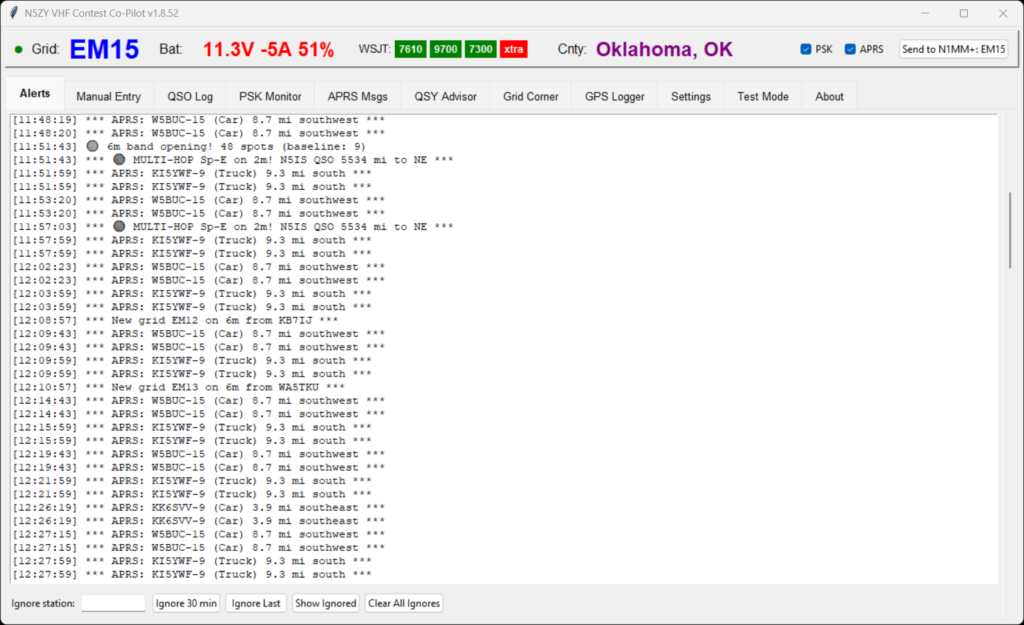
The Alerts tab is your real-time event feed. Every alert from every subsystem flows here: PSK Reporter propagation detections, APRS nearby station alerts, new grid spots, band openings, and county changes. The Ignore station feature lets you temporarily silence specific callsigns — those “WSJT alligators” who call CQ endlessly but never respond.
Status bar information
GPS Lock Indicator Large green/red circle — see GPS status from across the car. Grid displayed in large font.
Battery Monitoring Victron SmartShunt via Bluetooth LE — voltage, current draw, and state of charge.
WSJT-X Instance Status Color-coded indicators for up to 4 WSJT-X instances, named by radio (7610, 9700, 7300, xtra).
County Auto-Detection GPS coordinates looked up against Census TIGER shapefiles. Sent to N1MM+ for QSO parties.
Manual Entry
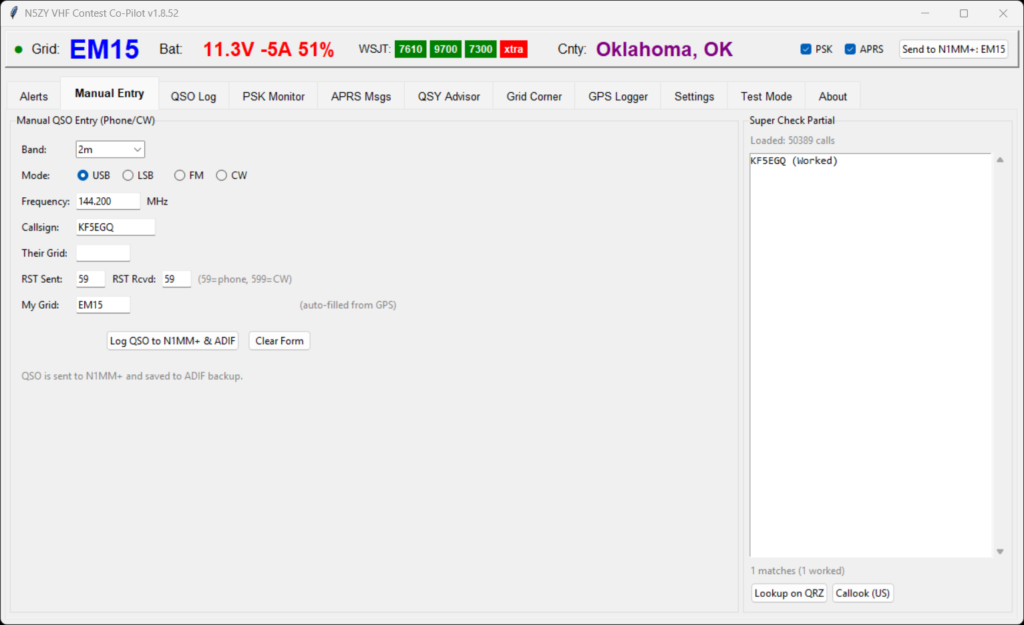
For phone and CW contacts that don’t go through WSJT-X, the Manual Entry tab gives you band selection (populated from your “My Bands” configuration), mode buttons (USB/LSB/FM/CW), and auto-filled frequency. The Super Check Partial panel on the right loads 50,000+ callsigns and shows matches as you type each character. Already-worked stations are marked “(Worked)” so you can quickly tell if this is a new multiplier.
If SCP doesn’t have a match, QRZ and Callook fallback buttons let you look up unknown callsigns. The “My Grid” field auto-fills from GPS, and in QSO Party mode the label changes to “My County” with auto-fill from GPS county detection. Every logged QSO goes to both N1MM+ and the Co-Pilot daily ADIF file.
QSO Log
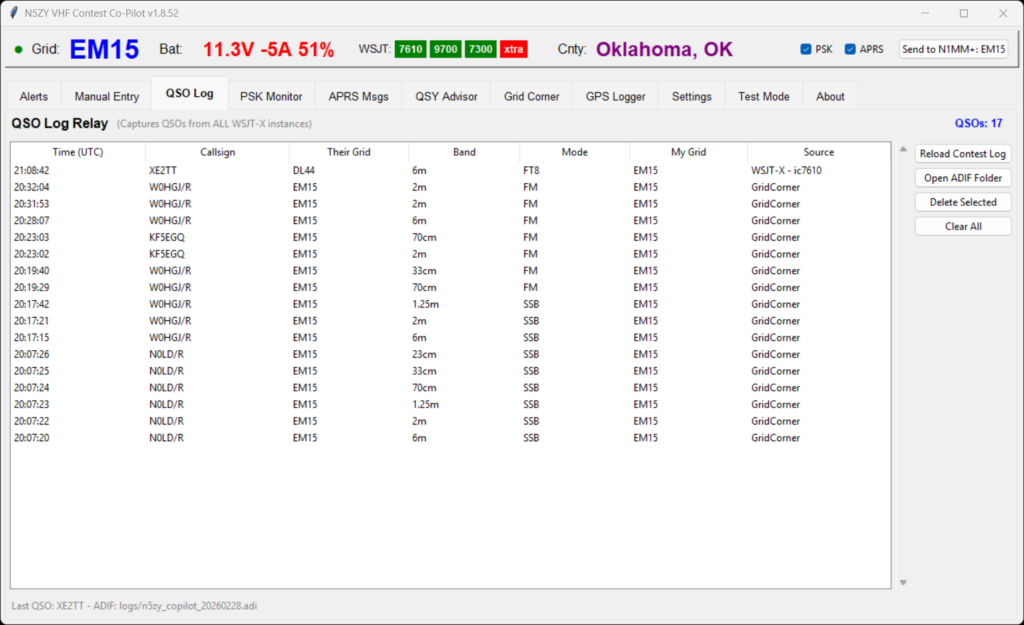
The Source column shows where each QSO originated — “WSJT-X – ic7610”, “GridCorner”, etc. Duplicate detection prevents the same QSO from being logged twice (important when WSJT-X relays to N1MM+ which echoes back). Daily log files are named n5zy_copilot_YYYYMMDD.adi and can be reloaded across sessions.
The Rover Post Contest Problem Solved with N5ZY Co-Pilot ADIF
Every QSO gets stamped with MY_STATE, MY_CNTY, MY_GRIDSQUARE, MY_DXCC, MY_CQ_ZONE, MY_ITU_ZONE, MY_LAT, and MY_LON. When you get home, import the Co-Pilot ADIF directly into your daily logger and upload to LoTW with correct location data. No more hours of manual editing.
PSK Reporter Monitor
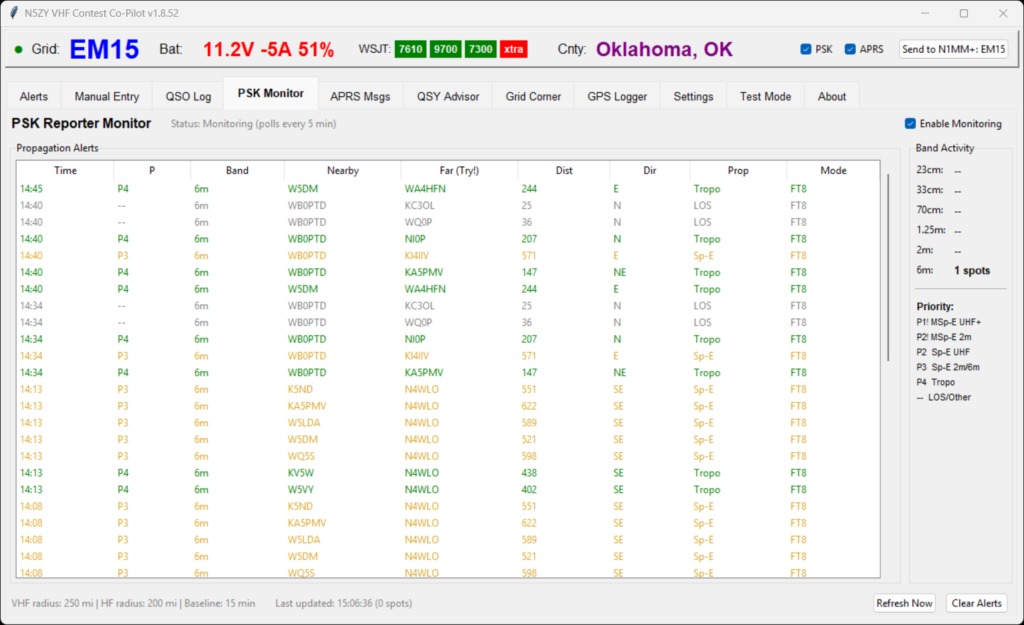
Co-Pilot polls PSK Reporter every 5 minutes and analyzes spots within your configurable radius (VHF: 250 mi, HF: 200 mi). It pairs nearby stations with far stations to determine propagation paths, then classifies them with a priority system:
P1 — Multi-hop Sp-E (PULL OVER!)
1,000+ mile 2m/70cm paths. Voice alert tells you to stop and work it NOW.
P2/P3 — Sporadic-E
2m/70cm and 6m Sporadic-E detection from path analysis.
P4 — Tropospheric
Enhanced tropo conditions detected from longer-than-normal paths.
Unusual Modes
Q65, MSK144, FT4 activity alerts — someone’s trying something different.
QSY Advisor
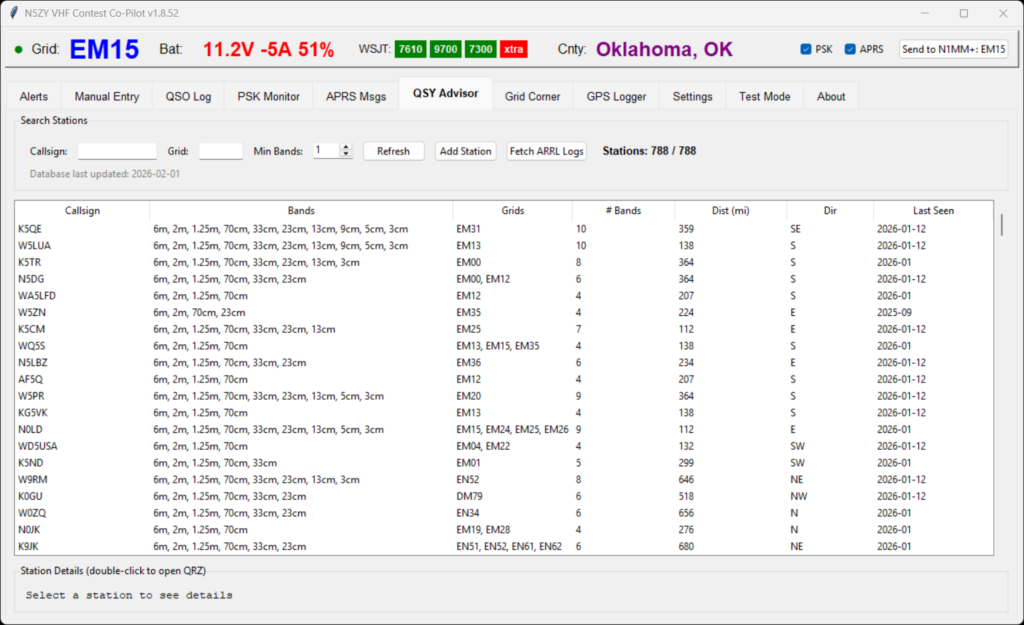
The QSY Advisor downloads 24 months of ARRL VHF contest public logs and builds a database of active stations — currently 788 entries. For each station you can see their callsign, which bands they’ve activated in prior contests, the grids they’ve operated from, distance and bearing from your current GPS position, and when they were last seen.
This is invaluable for contest planning: if K5QE is 359 miles SE in EM31 with 10 bands (6m through 3cm), you know to try him on everything. Filter by minimum bands to find the microwave-equipped stations, or search by grid to see who might be near a particular grid corner. Double-click any callsign to open their QRZ page.
Grid Corner Dance Manager
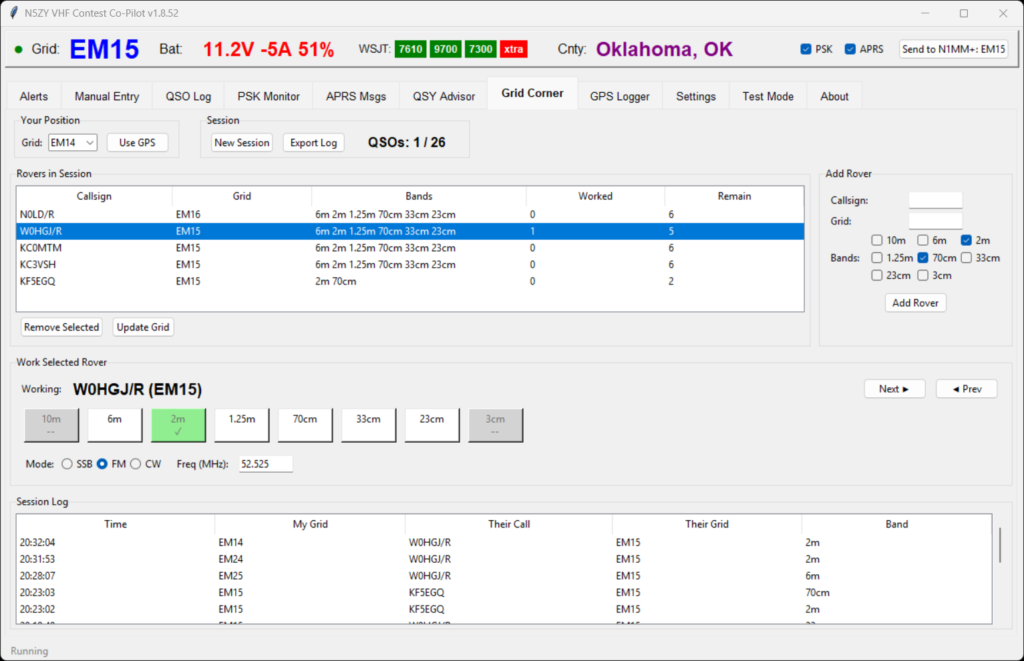
Grid corner dances are a VHF contest tradition: multiple rovers meet at a grid intersection and work each other on every available band from each grid square. With 5 rovers across 6+ bands in 4 grid squares, the number of possible QSOs gets large fast — and tracking who worked whom on which band from which grid becomes chaos.
The Grid Corner tab solves this. Add each rover with their callsign, starting grid, and bands. Select who you’re currently working, and the band buttons let you log each QSO with a single click. Buttons turn green when worked. When you or they move to a new grid, hit “Update Grid” and the buttons reset. The session tracks your progress (1/26 in this screenshot) and the session log at the bottom keeps a running record. Export the entire session to ADIF when you’re done.
APRS Messages
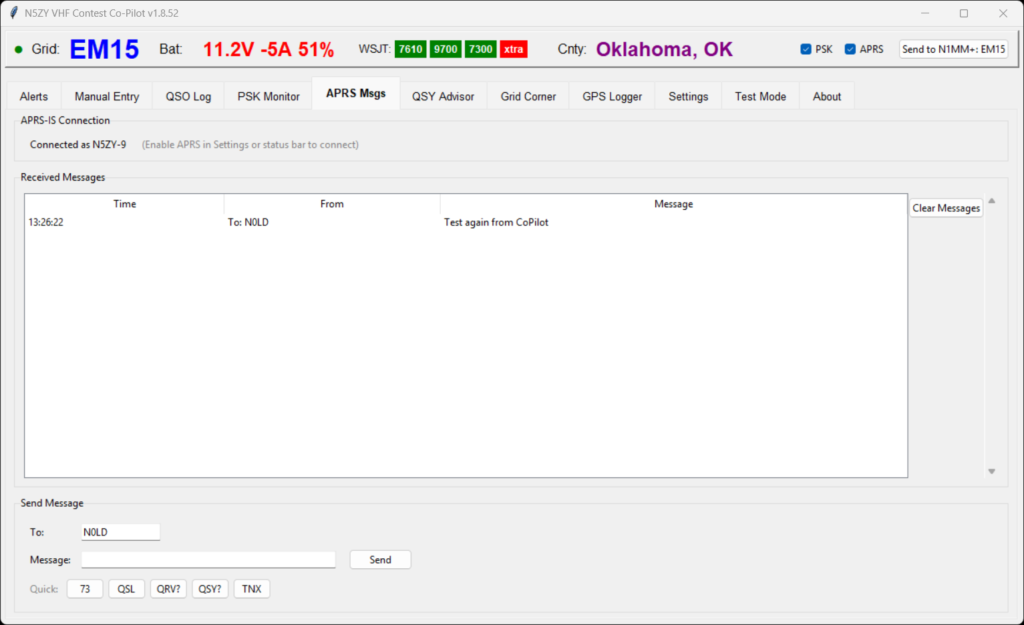
Co-Pilot connects to APRS-IS over the internet (I use Starlink — no RF conflict with 2m contesting). You can send and receive APRS messages to coordinate with other rovers, with quick reply buttons for common exchanges: 73, QSL, QRV?, QSY?, TNX. Incoming messages trigger a voice alert.
The system handles cross-SSID messages (your phone’s APRS app to Co-Pilot’s SSID), filters echoed messages and ack/rej packets automatically, and beacons your GPS position at a configurable interval. Nearby mobile station alerts let you know when other ham vehicles are within your set radius.
GPS Logger
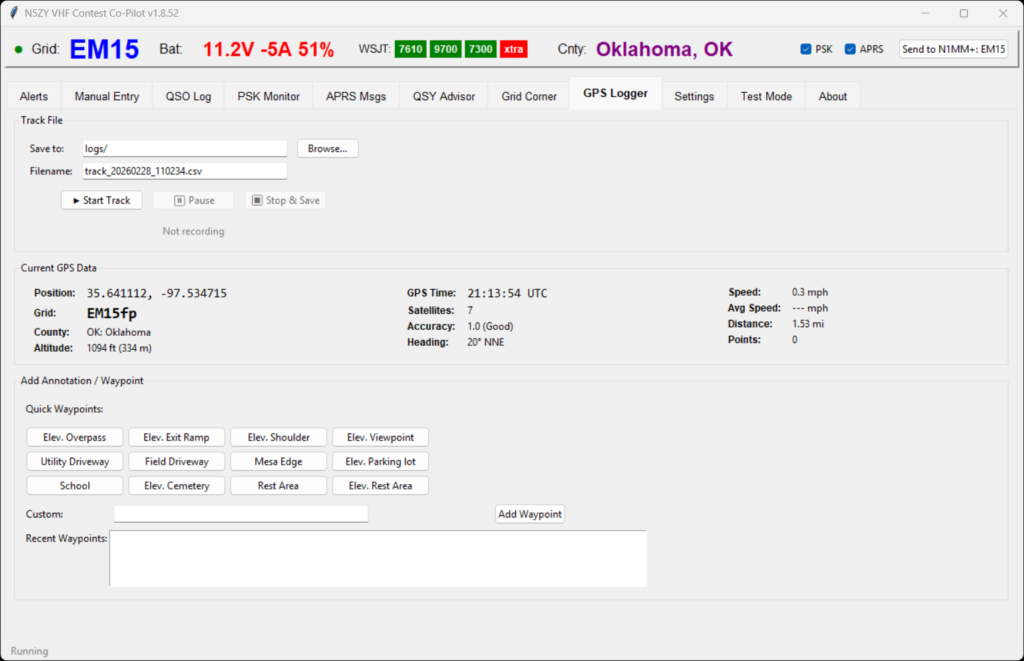
Beyond providing GPS coordinates to the rest of the app, the GPS Logger tab offers a dedicated track recording feature with start, pause, and stop controls saving to CSV. The live data display shows position, 6-character Maidenhead grid, state and county, altitude (feet and meters), satellites tracked, HDOP accuracy rating, heading, speed, average speed, and total distance traveled.
The 12 quick waypoint buttons are specifically designed for scouting rover operating positions between contests: Elevated Overpass, Exit Ramp, Shoulder, Viewpoint, Utility Driveway, Field Driveway, Mesa Edge, Parking Lot, School, Cemetery, Rest Area, and Elevated Rest Area. When driving around looking for good operating spots, one tap marks the location with a voice confirmation. A custom annotation field lets you add notes for anything not covered by the presets.
Settings
Extensive configuration for contest mode, GPS, radios, APRS, PSK Reporter, and notifications
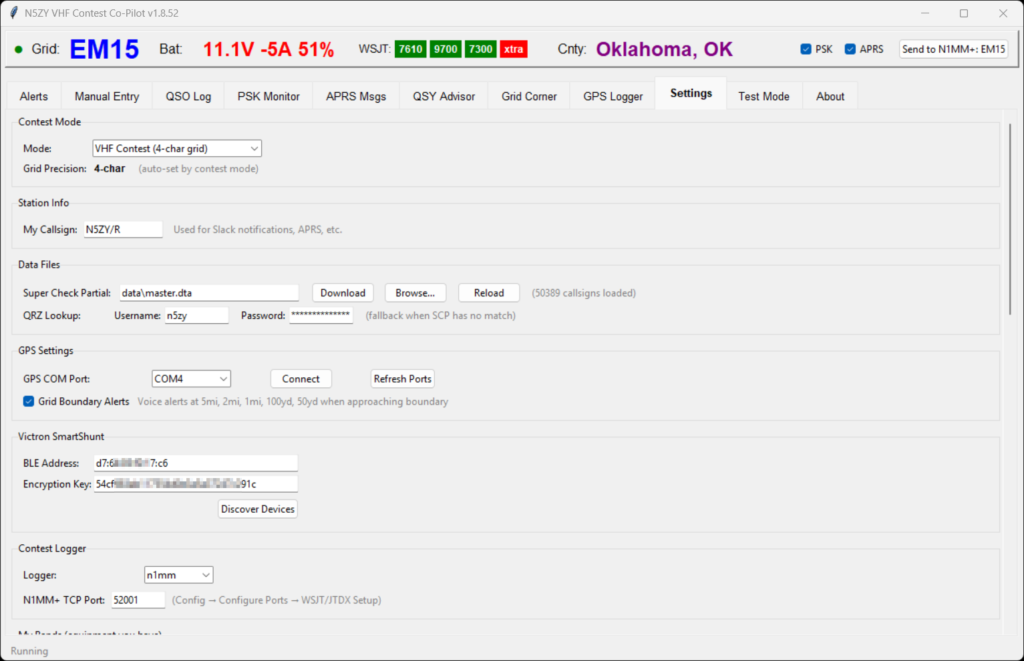
Contest mode, station info, data files (SCP + QRZ credentials), GPS, Victron SmartShunt, and contest logger selection.
Contest Mode switches between VHF Contest (4-char grid), 222 & Up, and QSO Party mode (which activates state/county selectors and loads N1MM QSO Party .sec files).
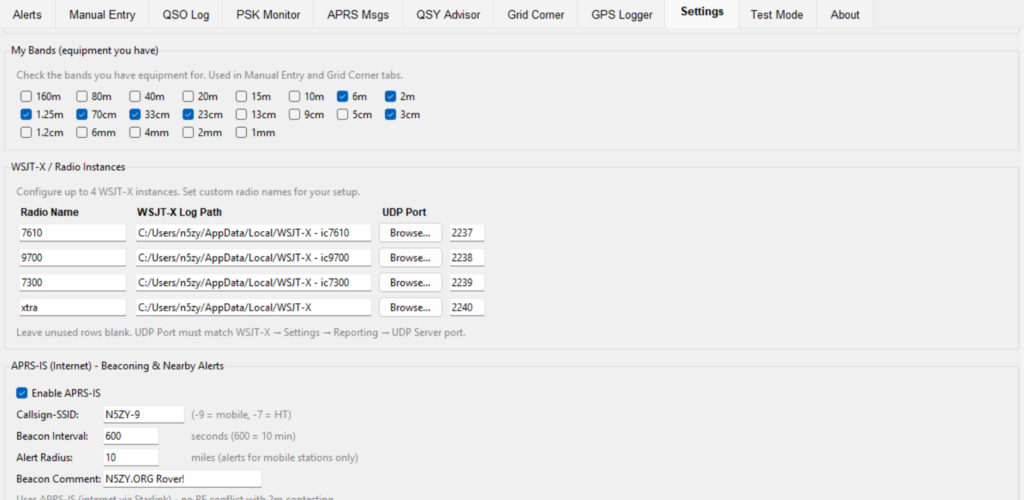
My Bands selection (160m to 1mm), four WSJT-X instance configuration, and APRS-IS beaconing settings.
My Bands checkboxes from 160m to 1mm drive the Manual Entry dropdown and Grid Corner band buttons — check only the bands you have equipment for. WSJT-X Instances supports up to 4 named instances with individual log paths and UDP ports.
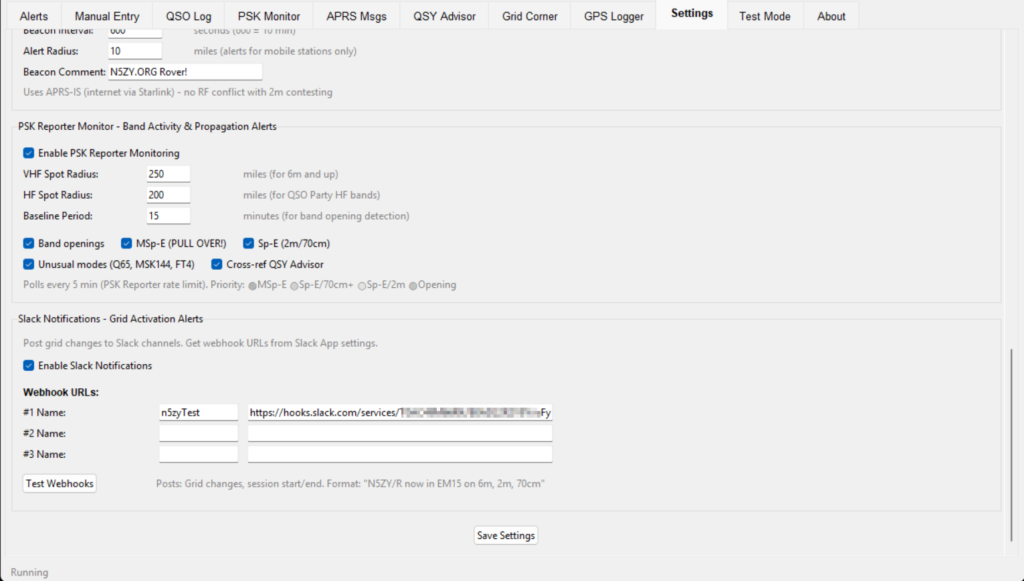
PSK Reporter monitoring with propagation alert types and priority, plus Slack webhook notifications for grid changes.
PSK Reporter settings let you configure VHF and HF spot radius, baseline period for opening detection, and which alert types are enabled — including the “MSp-E (PULL OVER!)” alert. Slack Notifications post grid changes to configured webhook channels in the format “N5ZY/R now in EM15 on 6m, 2m, 70cm” so chasers know where you are.
Voice Alerts — Eyes on the Road
Safety matters. Voice announcements for every important event so you never have to look at the screen while driving.
Grid Boundary Proximity
“Grid boundary in 5 miles… 2 miles… 1 mile… 100 yards… 50 yards… NOW in EM16!”
Grid & County Changes
Announces new grid and county when detected. Sends updates to WSJT-X and N1MM+ automatically.
Propagation Alerts
“PULL OVER! Multi-hop Sporadic-E on 2m!” — Band openings, Sp-E, unusual mode activity.
QSO & System
QSO logged, GPS lock acquired/lost, battery low warnings, APRS messages received, N1MM+/WSJT-X restart detection.
Test Mode
Grid precision toggle, manual grid test, voice/Victron/WSJT-X test buttons, and APRS-IS diagnostics (RX:866 TX:15).
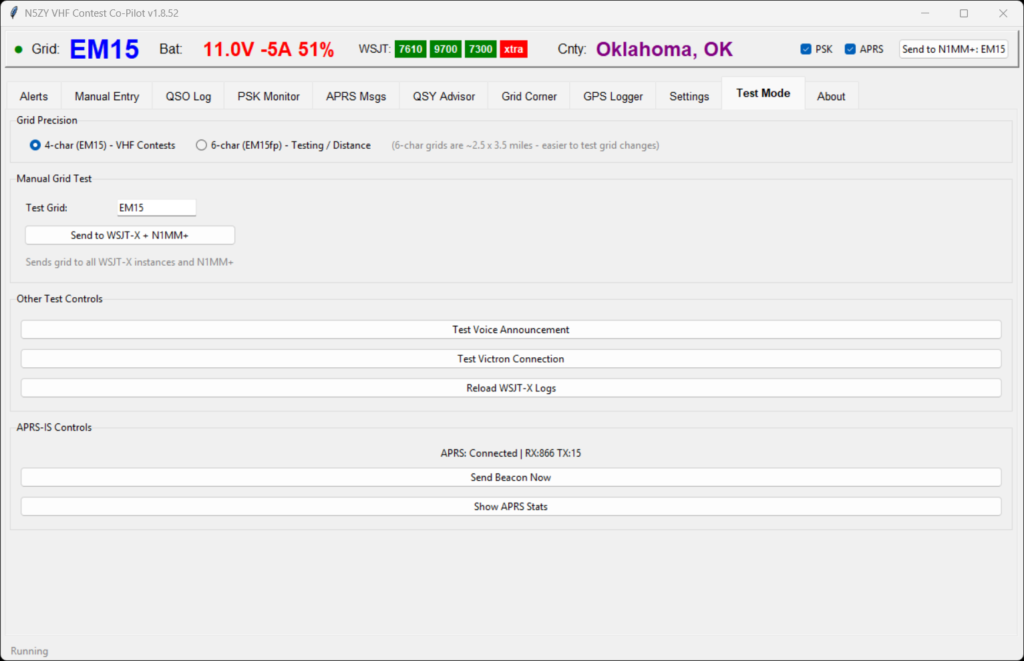
Verify everything before you leave the driveway.
The Test Mode tab lets you validate every integration without going mobile. Toggle between 4-character (VHF contest) and 6-character (222 and up testing) grid precision, send manual grid updates to all WSJT-X instances and N1MM+, test voice announcements, verify Victron BLE connectivity, reload WSJT-X logs, and send APRS beacons on demand.
About tab
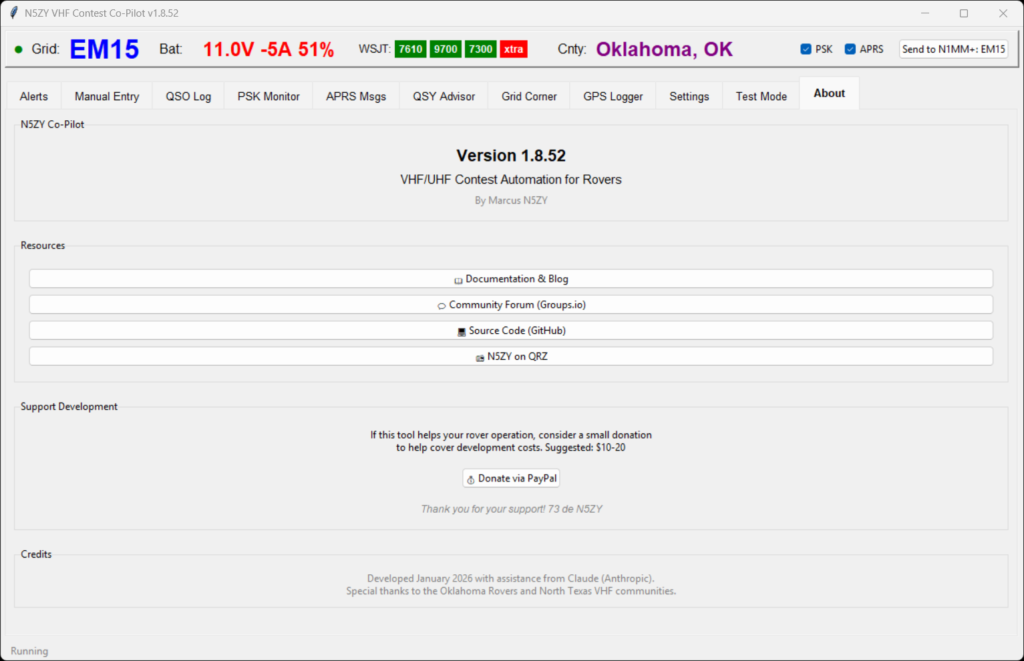
Version info, resource links, donation option, and credits.
Developed January/February 2026 with assistance from Claude (Anthropic).
Special thanks to the Oklahoma Rovers and North Texas VHF communities and the Central States VHF Society.
WSJT Autogrid
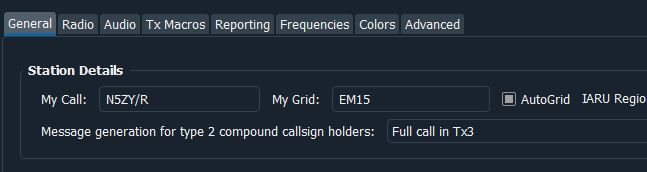
In WSJT you must enable “AutoGrid”
This DOES NOT change your “My Grid”, it instead changes your in TX6 when you CQ. If you close WSJT and re-open it or switch to a different saved config the grid reverts to your ‘My Grid’ however the application monitors for jt9.exe to have a new process ID. If it does then we resend the AutoGrid immediately.
WSJT Logging and ports
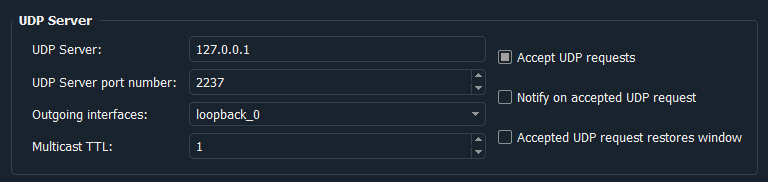
You can have up to (4) instances of WSJT HOWEVER each needs to have it’s own UDP Server Port number. 2237, 2238, 2239, 2240. This needs to match in N5ZY-CoPilot settings tab so CoPilot knows where to listen. With this set N5ZY-CoPilot can set your AutoGrid in 4 instances of WSJT simultaneously!
N1MM+ TCP Setting
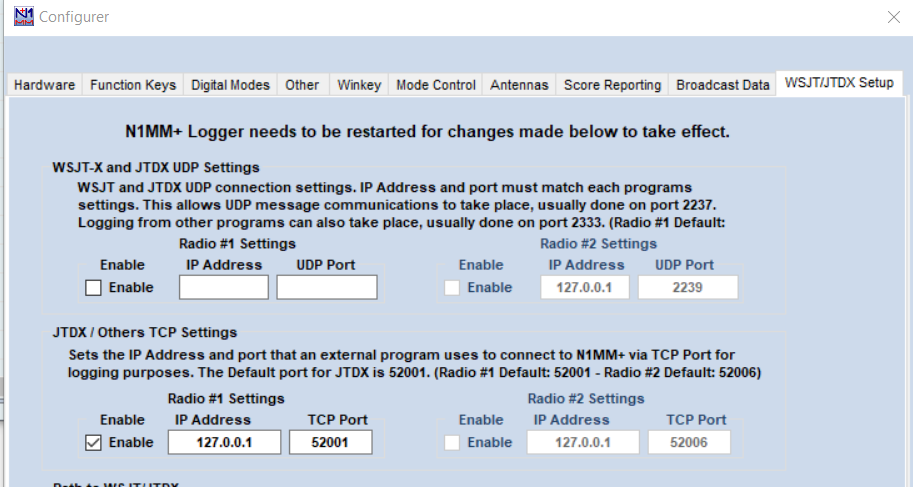
In N1MM to allow dynamic RoverQTH you must enable “JTDX / Others TCP Settings”.
Then N5ZY-CoPilot can set your RoverQTH in N1MM!
How It All Connects
Co-Pilot sits at the center of your rover station, bridging inputs from hardware and software with outputs to logging, networking, and notification systems.
Inputs
GPS via serial • WSJT-X (up to 4) ALL.TXT • N1MM+ or N3FJP via TCP • Victron SmartShunt via BLE • PSK Reporter API • QRZ / Callook
Outputs
WSJT-X grid updates via UDP • N1MM+ RoverQTH via TCP • ADIF daily logs with MY_* fields • APRS-IS beacons • Slack webhooks • Voice announcements